1.4.9.1. Pipeline Security Considerations
In the governance of large-scale Terraform modules, we typically execute a series of automated tests within the pipeline, such as verifying code validity or running terraform plan to check if example code executes successfully. The critical aspect of these tests is that they must connect to real cloud environments—such as Azure, AWS, or GCP—since the module's full functionality can only be verified when executed on actual cloud platforms.
However, this introduces a risk point distinctly different from traditional software component development: cloud resource access credentials. For the pipeline to function, we must configure credentials that grant access to cloud accounts. If these credentials are leaked or abused, the consequences are severe, potentially leading to the malicious creation, modification, or even deletion of cloud resources, resulting in direct financial loss and security risks.
This issue is particularly prominent in open-source projects. Open source means our code repositories are public; anyone can view the code or even submit Pull Requests. An attacker could submit a piece of carefully crafted malicious code. Once combined with the sensitive credentials on our pipeline for execution, they could leverage our pipeline permissions to perform malicious operations on cloud resources.
This lies the greatest challenge of pipeline security: How do we ensure automated tests run smoothly while preventing credential abuse? Compared to traditional software projects, the pipelines for Terraform modules are essentially running tests while "carrying the keys to the cloud," and if those keys fall into the wrong hands, the losses would be catastrophic. Therefore, we must design pipeline security mechanisms with extreme caution, ensuring that even if an ordinary open-source contributor submits code, they never have the opportunity to access our sensitive credentials.
1.4.9.1.1. Potential Attack Surfaces
In the pipelines of open-source Terraform modules, attackers may exploit the following attack surfaces to obtain or abuse cloud platform access credentials:
- Malicious Pull Request Injection: Attackers submit Pull Requests containing malicious Terraform configurations or scripts, attempting to execute them in unreviewed pipelines to access sensitive credentials.
- Supply Chain Attacks: Leveraging tampered third-party GitHub Action plugins or dependencies to execute malicious code within the pipeline.
- Workflow Configuration Tampering: Attackers may attempt to modify GitHub Actions workflow files (e.g.,
.github/workflows/*.yml) to bypass existing security measures. For instance, they might change trigger conditions, permission settings, or referenced third-party Actions to execute sensitive operations without authorization. - Unprotected Environment Variables: Storing sensitive information in unprotected environment variables within the pipeline, which attackers can obtain via logs or other methods.
- Lack of Approval Mechanisms for Sensitive Operations: Failing to set manual approval for sensitive operations like
terraform planorterraform applyin the pipeline, allowing unreviewed code to directly access cloud platform resources. - Attempting to Create and Persist Resources for Further Attacks: Terraform module testing naturally involves creating resources in the cloud. The key is what resources are created and whether they are destroyed after testing. Potential attackers might attempt to create malicious resources directly—such as servers for crypto mining, or high-privilege accounts and corresponding credentials—to control our test accounts even after the test concludes.
1.4.9.1.2. Two Types of Automated Checks
The checks we execute in Continuous Integration (CI) pipelines can generally be categorized into two types:
Credential-Free Automated Checks: Examples include code formatting (
terraform fmt) and static analysis tools (such astflint,tfsec). These tasks do not rely on any cloud platform access credentials, so they can run automatically when a Pull Request (PR) is created without human intervention.Sensitive Operations Requiring Credentials: Examples include running
terraform planorterraform apply. These operations require access to real cloud environments and must use valid cloud platform credentials. In open-source projects, automatically executing these operations in unreviewed PRs can lead to credential leakage or malicious exploitation, causing serious consequences.
1.4.9.1.2.1. Why Relying Solely on a Private, Non-Public Pipeline Is Insufficient
We see some open-source projects adopting a strategy where they maintain a publicly visible pipeline for credential-free automated checks in the open repository, while maintaining a non-public testing pipeline in a private environment for sensitive operations requiring credentials (e.g., executing terraform apply to test examples). This method does not thoroughly solve the risk because attackers can still use various covert means to inject malicious code into the testing process to steal our credentials. Sometimes, they don't even need to submit code changes to complete the attack; for example, by poisoning the supply chain and waiting for us to automatically execute the tampered dependency code in subsequent automated tests. A case in point is the StepSecurity report regarding tj-actions/changed-files.
We must assume that the attacker's code has already penetrated the test environment and has accessed all secrets used for testing.
1.4.9.1.3. GitHub Actions Environments
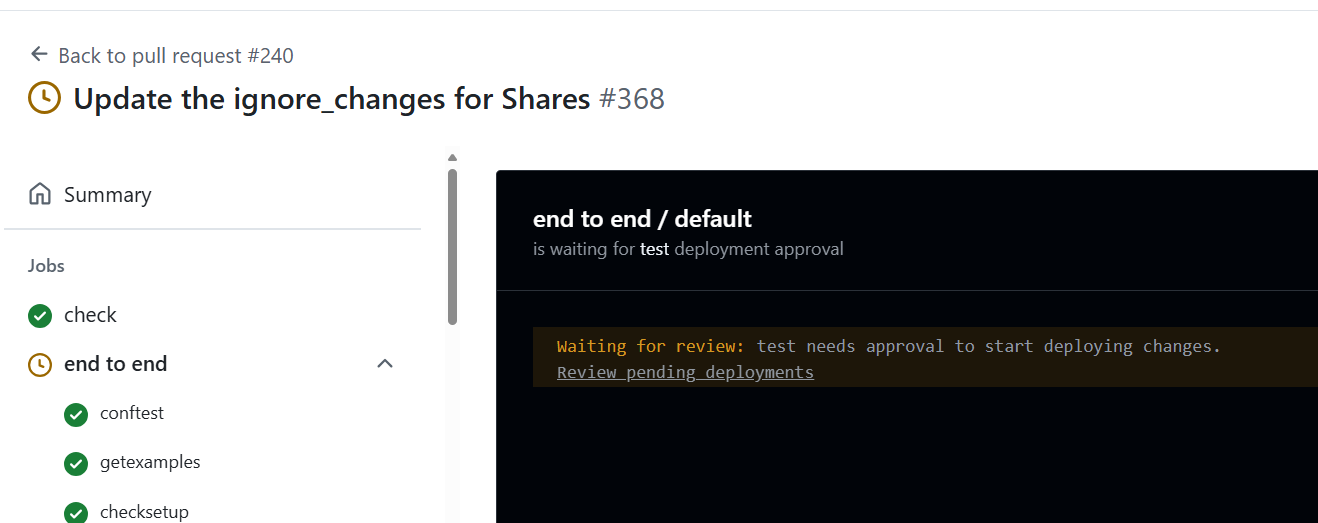
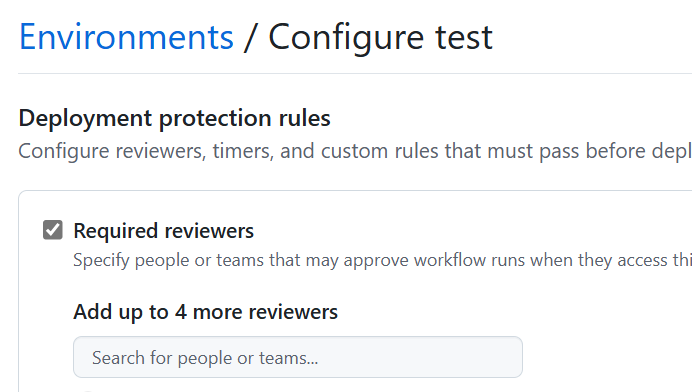
To address this issue, GitHub Actions provides Environments, allowing us to configure deployment protection rules for specific tasks. By setting environment protection rules, we can achieve the following goals:
- Manual Approval: Require specific reviewers to manually approve before executing sensitive operations.
- Restricted Secrets: Allow access to specific secrets only within specific environments, preventing unreviewed changes from accessing credentials.
For example, we can configure an environment named test for terraform apply operations and require approval from at least one reviewer. This way, even if someone submits a malicious PR, they cannot execute sensitive operations without approval, thus protecting the security of the cloud environment.
1.4.9.1.4. Which Authentication Method Should Be Used for Terraform Module Testing?
When interacting with public clouds, Terraform often needs to provide credentials representing an identity to successfully call APIs after authentication. Taking Azure as an example, it supports the following authentication methods:
- Authenticating via Azure CLI
- Authenticating via Managed Identity
- Authenticating via Service Principal and Client Certificate
- Authenticating via Service Principal and Client Secret
It must be emphasized that all the above authentication methods are incorrect. Please do not use them in your open-source projects.
1.4.9.1.5. OpenID-Connect (OIDC) Authentication
To date, the only known secure method for authentication in Terraform module testing is using OpenID-Connect. Both AWS and Azure support this authentication method. Once OIDC is configured, a credential can only be successfully retrieved within the specified environment of the specified GitHub repository, and that credential cannot function in other repositories or outside that environment.
1.4.9.1.5.1. Testing Process for Pull Requests from Forked Repositories
Since GitHub's OIDC mechanism does not support invoking cloud identity authentication in Forked repositories, this means Pull Requests (PRs) submitted by external contributors cannot directly use OIDC credentials on the pipeline to connect to the cloud platform, preventing the completion of full end-to-end tests (such as running terraform plan to check if example code can truly be deployed to the cloud).
To solve this problem, we adopt a branching strategy:
- Contributor Submits PR: When an external contributor submits code, only credential-free checks are triggered, such as
terraform fmt,tflint, and other static checks, ensuring basic code quality. - Maintainer Merges to Release Branch: Once the preliminary review is passed, the module maintainer merges the PR into a dedicated
releasebranch in the main repository. Since this branch resides in the main repository, its pipeline possesses full OIDC permissions. - Execute End-to-End Tests: In the
releasebranch, the pipeline runs end-to-end tests requiring real cloud credentials, such asterraform plan, ensuring the module executes correctly in a real environment. - Merge to Main Branch After Confirmation: Only after tests pass is the code finally merged into the
mainbranch, completing the release.
┌──────────────────────────────┐
│ Contributor submits PR       │
└────────────┬─────────────────┘
             │
             ▼
┌──────────────────────────────┐
│ Module Maintainer reviews PR,│
│ checks for malicious code or │
│ workflow changes             │
└────────────┬─────────────────┘
             │
             ▼
┌─────────────────────────────┐
│ Create release branch (sugg.│
│ name: release/<desc>)       │
└────────────┬────────────────┘
             │
             ▼
┌──────────────────────────────┐
│ Edit PR, change target branch│
│ to the new release branch    │
└────────────┬─────────────────┘
             │
             ▼
┌────────────────────────────┐
│ Wait for PR checks, verify │
│ code, merge to release br. │
└────────────┬───────────────┘
             │
             ▼
┌────────────────────────────┐
│ Create new PR from release │
│ branch to main branch      │
└────────────┬───────────────┘
             │
             ▼
┌────────────────────────────┐
│ Trigger E2E tests, owner   │
│ approves test run          │
└────────────┬───────────────┘
             │
             ▼
┌────────────────────────────┐
│ E2E Tests Passed?          │
└───────┬────────────┬───────┘
        │            │
        ▼            ▼
  Yes, merge to    No, investigate
     main           failure
        │            │
        ▼            ▼
  Process End    ┌───────────────────────┐
                 │ Collaborate w/ user to│
                 │ fix or fix in release │
                 └───────────────────────┘
The most common attack vector is tampering with Actions workflow definitions within a Pull Request to bypass our established review processes and run malicious code directly in a sensitive environment to steal credentials. This dual Pull Request process ensures that all tests must undergo strict approval by maintainers before execution, combining automated checks with manual review to minimize risk to the greatest extent. Interested readers can read the relevant content in the AVM specification here.
1.4.9.1.6. Two-Tier Cloud Account System
Potential attackers might attempt to create resources during testing that are not automatically destroyed by terraform destroy, allowing them to continue abusing these resources after the test ends. A typical method for this type of attack is using null_resource + local-exec to execute native cloud platform commands (e.g., Azure CLI) to create resources outside the Terraform state file. These "escaped" resources are neither destroyed during terraform destroy nor easily detected through normal Terraform state checks. For example, attackers might:
- Create hidden high-privilege accounts or access keys;
- Deploy virtual machines for crypto mining;
- Leave backdoor programs or continuously running tasks to re-intrude in the future.
Even if we configure periodic cleanup tasks in the test environment to automatically destroy resources that have timed out, the cleanup logic itself could be sabotaged or bypassed by malicious code. This is especially true if the cleanup logic runs within the same test account, where an attacker could use existing permissions to disable or counter the cleanup tasks. This leads to a deeper security question: How do we effectively prevent the test account from being "persistently compromised"?
1.4.9.1.6.1. The "Control Plane - Data Plane" Concept
To counter this threat, we must introduce the classic "Control Plane" and "Data Plane" separation concept from cloud security. Key design points include:
- Control Plane Account (High Privilege): This account is primarily used for operations and oversight, possessing full permissions over the test environment, including monitoring, resource auditing, anomaly detection, and forced cleanup. It does not directly participate in the pipeline execution, so it is not exposed in the pipeline's credentials and is not directly threatened by malicious code in the pipeline.
- Data Plane Account (Low Privilege): This is the account used by the pipeline when executing tests. Its permissions are strictly limited:
- Allowed to operate only within specific Resource Groups/Projects/Subscriptions;
- Prohibited from creating high-privilege identities (e.g., new Service Principals, Users, or Role Assignments);
- Subject to resource quota limits (e.g., maximum VM count, prohibition of GPU instances, etc.).
1.4.9.1.6.2. Operational Mechanism
In this architecture, all pipeline test operations occur under the "Data Plane Account." Even if an attacker creates residual resources via malicious code, these resources remain fully visible to the "Control Plane Account." The Control Plane Account periodically executes:
- Resource Inventory: Performs a full scan of resources in the Data Plane Account to identify timed-out or abnormal resources;
- Privilege Escalation Detection: Checks for high-risk operations outside the whitelist, such as IAM changes;
- Forced Destruction: Cleans up all resources violating security policies to ensure the test environment remains "unpolluted."
This two-tier system provides a "safety net for the worst-case scenario": even if the pipeline is compromised, the impact is confined to the low-privilege scope, preventing the attacker from achieving persistent occupation or causing widespread damage.
1.4.9.1.6.3. Key Considerations
- Account Independence: Credentials for the Control Plane Account must be strictly kept secret and must forbidden from appearing in pipelines or public environments; ideally, they should be held and operated only by the security team.
- Defense in Depth: Even if the Data Plane Account is compromised, the attacker cannot pivot laterally to other accounts or escalate privileges.
- Resource Auditing: Enable cloud provider automated auditing tools (such as Azure Policy + Defender) wherever possible to automatically trigger violation alerts.
1.4.9.1.7. Additional Thoughts: Other Aspects of Pipeline Security
Beyond protecting cloud platform credentials, we must also focus on the security of the pipeline itself, especially when using third-party components and modules. Here are some key security practice recommendations:
1.4.9.1.7.1. Use Only Trusted Third-Party GitHub Actions
When introducing third-party GitHub Actions into your workflow, ensure their source is trustworthy. Prioritize the following types of Actions:
- Actions maintained officially by GitHub.
- Actions with the GitHub Verified Publisher badge (blue checkmark).
- Actions maintained by well-known organizations or active communities.
For unfamiliar Actions, it is recommended to review the code first to ensure it contains no malicious code or insecure operations.
1.4.9.1.7.2. Pin Third-Party Action Versions Using Git Commit Hashes
To prevent third-party Actions from being maliciously updated or having their tags tampered with, it is recommended to use Git commit hashes (commit SHA) in your workflows to lock specific versions. For example:
- uses: actions/checkout@11bd71901bbe5b1630ceea73d27597364c9af683 #v4.2.2
This practice ensures that every workflow run uses verified code versions, reducing the risk of supply chain attacks.
1.4.9.1.7.3. Minimize Dependencies and Reference Only Trusted Terraform Modules
In module development, follow the principle of minimal dependencies to avoid introducing unnecessary external modules. For modules that must be used, ensure their sources are trusted and regularly review their updates.
Furthermore, it is recommended to use version control for modules, employing Semantic Versioning, and explicitly specifying the version ranges of dependent modules and providers in the versions.tf file to prevent issues caused by incompatible updates.
The AVM specification mandates that AVM module code is only allowed to reference other AVM modules.
1.4.9.1.7.4. Regularly Audit and Update Dependencies
Regularly use tools (such as dependabot) to check and update project dependencies, including GitHub Actions, Terraform modules, and Providers. Apply security patches in a timely manner to fix known vulnerabilities and maintain project security and stability.
By implementing the above security practices, you can further strengthen pipeline security protection, reduce potential risks, and ensure stability and security when governing large-scale Terraform modules.